
How To Check NECO Result: Step-by-Step Guide
Are you Looking for a fast and reliable way to check your NECO result online? If yes, then you’re in the right place. Every year, thousands of candidates across Nigeria turn to the National Examinations Council (NECO) portal to access their exam scores, but many still find the process confusing or frustrating.
In this guide, you’ll discover the exact steps to check your NECO result, the requirements you need (including the NECO token), and how to avoid common mistakes that can delay you.
What Is NECO?
The National Examinations Council (NECO) is a Nigerian examination body responsible for conducting secondary school exams like:
- SSCE (Internal and External)
- GCE (General Certificate Examination)
After writing the exam, candidates must check their results online using an official portal.
What You Need To Check Your NECO Result
Before you begin, make sure you have the following ready:
NECO Result Checker Token
This is a unique PIN/code used to access your result online.
Examination Number
Your NECO exam number (e.g., 12345678AB)
Exam Year
The year you wrote the exam (e.g., 2025)
Valid Internet Connection
You can use a phone, laptop, or cyber café.
Step-By-Step Guide: How To Check NECO Result Online
Follow these simple steps:
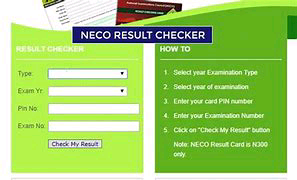
Step 1: Visit The Official NECO Result Portal
- Go to the official NECO result checking website.
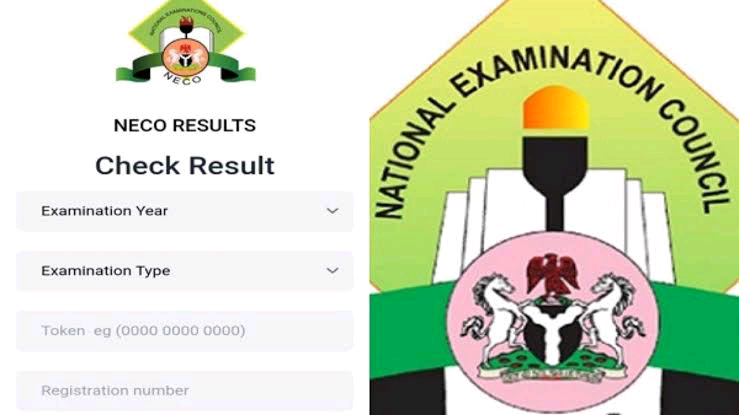
Step 2: Enter Your Exam Details
You will see a form asking for:
- Exam year
- Exam type (SSCE Internal, SSCE External, or GCE)
- Token
- Registration number
Step 3: Input Your Token
- Carefully enter the result checker token you purchased.
Step 4: Click “Check Result”
- Once all details are correct, click the button.
Step 5: View Your Result
Your NECO result will appear instantly on the screen.
You can:
- Screenshot it
- Print it
- Save it as a PDF
How To Buy NECO Result Checker Token
To check your result, you must first buy a token. Here are common ways:
Online Purchase
- You can buy directly from NECO’s official website using:
ATM card (Debit card)
- Online payment platforms
- Banks
Visit banks like:
- First Bank
- Access Bank
- Zenith Bank
Ask for a NECO result checker token.
Cyber Cafés
- Most cyber cafés in Nigeria sell tokens and can help you check your result instantly.
How Much Is NECO Result Checker Token?
The price may vary slightly, but typically:
- Around ₦1,000 to ₦1,500 per token
Always buy from trusted sources to avoid scams.
Common Problems When Checking NECO Results (And Solutions)
Many students face issues while checking their results. Here are the most common ones:
Invalid Token
Cause: Wrong or already-used token
Solution:
- Double-check the code
- Buy a new token if necessary
Incorrect Exam Number
- Cause: Typing error
Solution:
- Re-enter your exam number carefully
Result Not Available
- Cause: Result not yet released
Solution:
- Wait and check again later
Network Issues
- Cause: Poor internet connection
Solution:
- Try again with better network
Use A cyber Café
Website Not Loading
- Cause: High traffic on NECO portal
Solution:
- Try during off-peak hours (early morning or late night)
Can You Check NECO Result Without Token?
No. You must have a valid token to check your NECO result. Unlike some exams in the past, NECO no longer uses scratch cards.
How To Print Your NECO Result
After checking your result:
- Click the print option on your browser
- Connect to a printer
- Print a hard copy
Or:
- Save as PDF and print later
Is NECO Result Accepted In Nigeria And Abroad?
Yes, NECO results are widely accepted:
- Nigerian universities
- Polytechnics
- Colleges of education
Some international institutions also accept NECO, depending on their requirements.
Tips To Keep Your NECO Result Safe
- Save a digital copy (PDF or screenshot)
- Print multiple copies
- Keep your token safe (if still valid)
- Email a copy to yourself
Frequently Asked Questions – (FAQs)
How Long Does It Take For NECO Results To Be Released?
Usually between 45 to 90 days after the exam.
Can I Use One Token Multiple Times?
No. Each token has limited usage.
Can I Check My NECO Result On My Phone?
Yes. You can use any smartphone with internet access.
What If I Lost My Exam Number?
Check:
- Your exam slip
- Your school
- NECO registration records
Can Someone Else Check My Result For Me?
Yes, as long as they have your:
- Exam number
- Token