JAMB Reprint Portal 2026: How To Reprint Your JAMB Slip Easily (Step-by-Step Guide)
If you’re preparing for the jamb 2026, one of the most important things you’ll need before your exam is your JAMB examination slip. This is where the JAMB reprint portal comes in.
Many candidates get confused about how to access it, when to reprint, or what details they need. Don’t worry—this guide will walk you through everything you need to know
What Is The JAMB Reprint Portal?
The JAMB reprint portal is the official page provided by Joint Admissions and Matriculation Board where candidates can:
- Reprint their UTME exam slip
- Check their exam date
- Confirm their exam time
- See their assigned CBT center
In simple terms, it’s the website you visit to print the document that tells you when and where your exam will take place.
Why The JAMB Reprint Slip Is Important
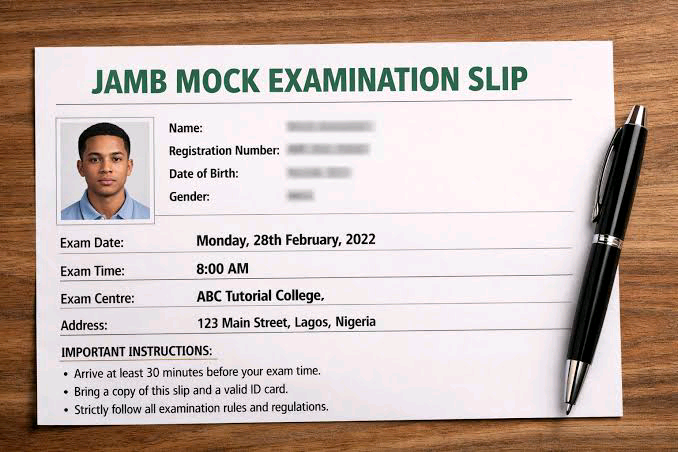
Your JAMB slip is not just a piece of paper—it is your entry pass into the exam hall.
Without it, you may not be allowed to write your exam.
Here’s what the slip contains:
- Your full name
- Registration number
- Exam date
- Exam time
- CBT center address
- Subject combination
When Does JAMB Reprinting Start?
JAMB usually opens the reprint portal:
- About 5–7 days before the UTME exam begins
It’s very important to check early because:
- Your exam date might be sooner than expected
- You may need time to locate your exam center
Pro tip: Don’t wait until the last minute.
Official JAMB Reprint Portal Link
To reprint your slip, always use the official portal:
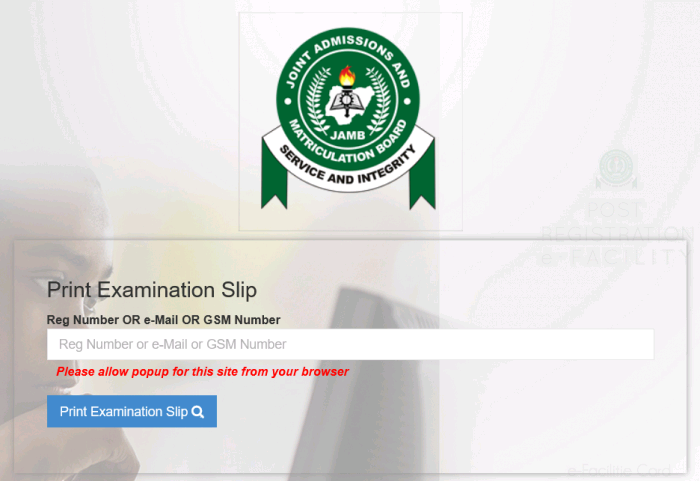
- From there, navigate to the “Print Examination Slip” section.
Warning: Avoid clicking random links on social media. Many fake websites are created to scam candidates.
Step-By-Step Guide To Reprint JAMB Slip
Follow these simple steps:
Step 1: Visit The Official Website
Go to the JAMB portal:
- https://www.jamb.gov.ng
Step 2: Find “Print Examination Slip”
Look for the option that says:
- “Print UTME Examination Slip”
- Click on it.
Step 3: Enter Your Details
You will be asked to enter:
- Your JAMB Registration Number OR
- The email address you used during registration
Step 4: Click Print
After entering your details:
- Click on “Print Examination Slip”
- Your slip will appear on the screen
Step 5: Download or Print
- Save it as a PDF
- Print a hard copy (recommended)
What To Do After Printing Your Slip
Once you’ve successfully printed your slip:
Check Your Exam Date And Time
Make sure you know exactly:
- The day of your exam
- The time you’re expected to arrive
Locate Your Exam Center Early
If your center is unfamiliar:
- Visit the location a day before
- Plan your transport route
Prepare Your Documents
You’ll need:
- Your printed JAMB slip
- A valid ID (if required)
Common Problems And How To Fix Them
Many candidates face issues while trying to reprint. Here are solutions:
Portal Not Opening
Possible causes:
- High traffic
- Poor internet connection
Solution:
- Try again later
- Use a better network
Incorrect Details
Solution:
- Double-check your registration number
- Make sure there are no typing errors
Slip Not Showing
Solution:
- Wait until reprinting officially starts
- Confirm that you registered successfully
Forgot Registration Number
Solution:
- Check your email inbox
- Look for your JAMB registration confirmation
How To Avoid Scams When Using The JAMB Portal
Unfortunately, many fake sites target students during this period.
Stay safe by following these tips:
- Only use the official JAMB website
- Don’t pay anyone to “help you reprint”
- Avoid clicking suspicious links on WhatsApp or Telegram
- Never share your login details
Quick Summary Table
| Task | What to Do |
|---|---|
| Access Portal | Visit JAMB official website |
| Required Info | Registration number or email |
| Output | Exam slip with date & center |
| Best Time | As soon as portal opens |
| Safety Tip | Avoid fake links |
Expert Tips For A Smooth Experience (EEAT)
To ensure credibility and real-world usefulness, here are expert-backed tips:
Print Multiple Copies
- Keep at least 2–3 copies in case one gets lost.
Use A Cyber Café if Needed
If you don’t have a printer:
- Visit a trusted cyber café
- Make sure they don’t save your details
Check For Updates
Sometimes JAMB may:
- Reschedule exams
- Change centers
Always recheck your slip if notified.
Frequently Asked Questions – (FAQs)
Can I reprint My JAMB Slip With My Phone?
Yes, but you may need a printer to get a hard copy.
Is It Compulsory To Print The Slip?
Yes. It is required for entry into the exam hall.
Can I Change My Exam Date?
No. JAMB assigns dates automatically.
What If I Miss My Exam Date?
Unfortunately, JAMB does not usually reschedule missed exams.
Is The JAMB Reprint Free?
Yes. You do not need to pay to reprint your slip.